Products

Measuring, alerting and controlling.

All developed in-house. We develop the circuit boards, firmware and platform ourselves, in Moordrecht. Independent of concrete plant, mix and formwork.

Where do you measure?

Construction site

When can the formwork come off, and can I prove it?

Precast

The same cycle every day, with less heating.

Formwork pressure

See the formwork pressure while you pour. New

Road construction

Measure the temperature in the asphalt layer. New

01
Measure

Temperature in the concrete. The platform calculates maturity and strength.

The Sensorbox BM-413, three-quarter front view: red housing, start button and label on the lid, three connections at the end.

3D view of the actual print model of the housing.

Measure · maturity computer

Sensorbox BM-413

Three sensors in the concrete, one press of the button. The box sends the temperature to the platform, which turns it into maturity and strength per sensor.

3 × type Jthermocouples
−30…+200 °Cmeasuring range
LTE-MSIM card included
17 Ahbattery, charging via USB-C
  • With the magnet against the steel formwork, or simply on the pour
  • Measures every 10 minutes; sends every 10 minutes up to every 4 hours
  • No signal? It stores the measurements and sends them later
Item 1300

Specifications

Sensors
3 × type J thermocouple, plug-in at the side; built-in ambient sensor
Measuring range
−30 to +200 °C; outside that, the box reports a measuring error
Measuring cable
25 m per sensor, type J, blue sheath; stays in the concrete
Interval
Measures every 10 minutes; sends every 10 minutes, adjustable up to every 4 hours
Connection
LTE-M, NB-IoT as fallback; SIM card included, active on delivery
Battery
Li-ion, 18650 cells; 5 cells in parallel (1S5P), own pack, built in Moordrecht
Voltage and capacity
3.6 V nominal; 17 Ah (±61 Wh)
Charging
Via USB-C, 5 V, with any USB-C charger
Battery protection
Protection circuit in the pack (overcharge, deep discharge, short circuit) and a temperature sensor in the pack: the box only charges at a safe temperature
Battery replacement
Built in; replaced at Verboom, during servicing
Transport
Under 100 Wh: a box with a built-in battery may be shipped as an ordinary parcel (Li-ion in equipment, UN3481); see the guide Storage and shipping
Mounting
Magnet, for the steel formwork
Operation
One button; starting, stopping and preparing can also be done from the platform
Fault detection
Per port: open, interference, leakage and wear, with an explanation in the platform
Calculation method
Calculates using the maturity method (NEN 5970): weighted maturity according to De Vree, with the C-value per mix
Weight
750 g
Updates
Firmware over the air

In the case

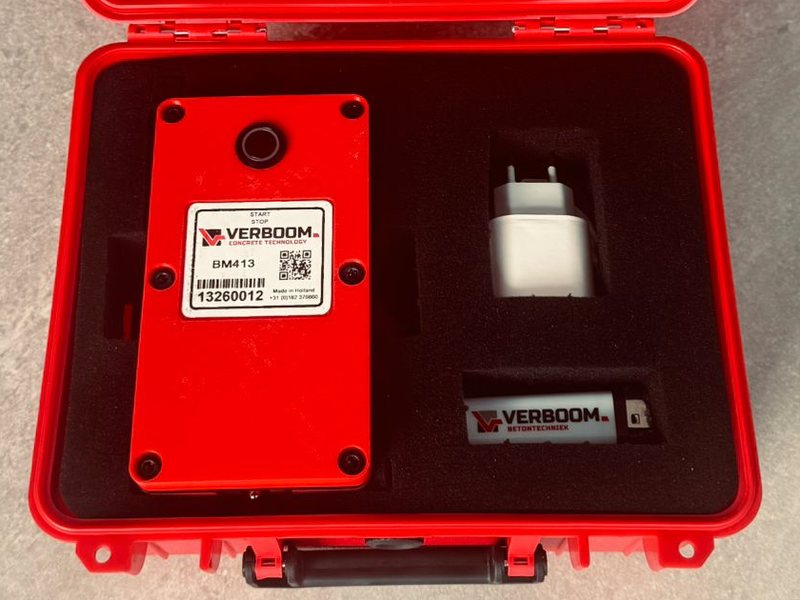
The open red case: the Sensorbox BM-413 in the foam, next to it the USB-C adapter and a lighter.
  • Sensorbox BM-413
  • USB-C adapter
  • Heat-shrink tubing and a lighter, to make the measuring point
  • The Quick Start Guide, also online at /start/en

The complete set also includes three 25 m thermocouple cables. Protective case 29 × 24 × 13 cm; the complete set weighs approx. 3.3 kg.

A Sensorbox BM-411 with one connection on a fresh floor slab, the blue measuring cable coiled beside it.
Measure

Sensorbox BM-411

The same Sensorbox with one connection, for when one measuring point is enough.

  • 1 × type J thermocouple
  • LTE-M, SIM card included
  • Same button, magnet and platform as the BM-413
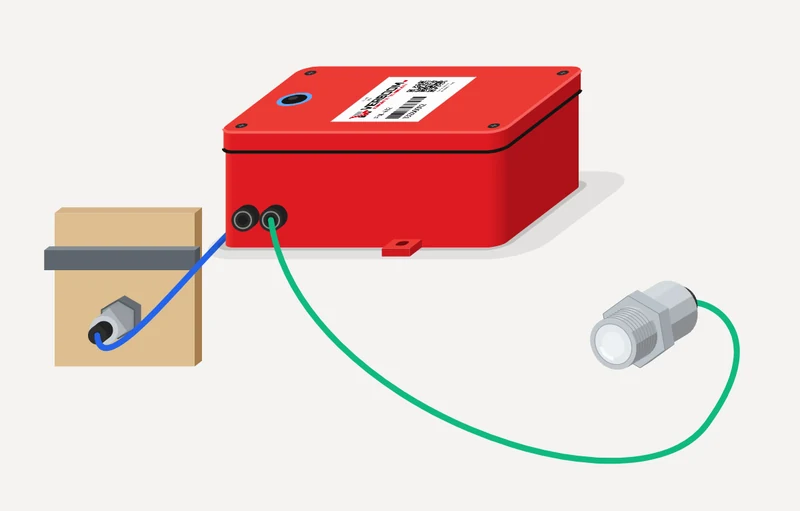
Drawing of the red Sensorbox BM-412 with two connections, each with a cable to a measuring point.
Measure New

BM-412 asphalt set

The Sensorbox with two measuring points in the asphalt layer: in the middle of the lane and at the edge or the joint. How warm the layer is, how fast it cools, and where it gets too cold first.

  • Two type J thermocouples, measuring range up to 200 °C
  • Built into the old surface course beforehand, or behind the screed under the fresh layer
  • Every measurement stored and sent on via LTE-M; export to CSV
Measure In development

Measuring humidity

We are working on a sensor for air humidity. Interested? Ask us about it.

In developmentAsk about it
02
Formwork pressure

See the formwork pressure while you pour.

Drawing of the red Formwork Pressure Box PM-412 with two pressure connections.
Measure New · first field tests running

Formwork Pressure Box PM-412

Stands by the wall, reads two formwork pressure sensors every second and sends the pressure via LTE-M to the platform.

  • Two pressure connections: at the bottom and halfway up
  • Larger battery pack than the Sensorbox BM-413
  • Notification by app, text or email above the limit you set yourself
Item 1200 · set 1201About formwork pressure
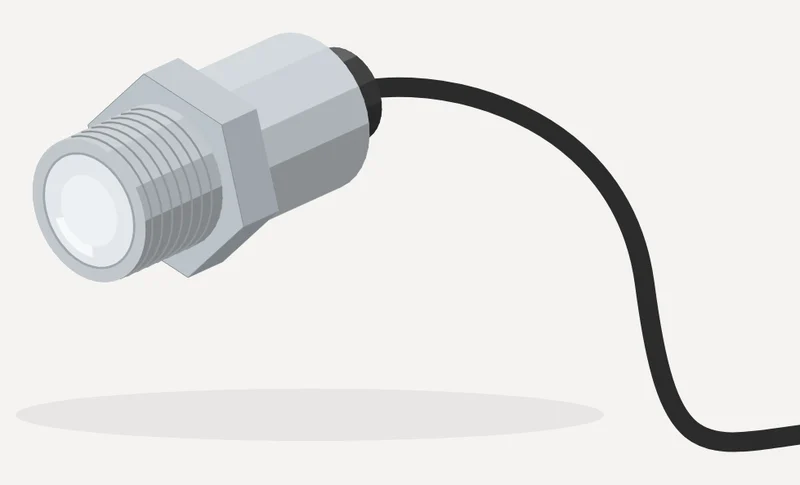
Drawing of the formwork pressure sensor with a flat stainless steel diaphragm and cable.
Measure New · first field tests running

Formwork pressure sensor 0–0.4 MPa

Two per wall: one at the bottom, where the pressure is highest, and one halfway up.

  • Flat stainless steel diaphragm, flush with the formwork face
  • Measures 0–0.4 MPa, every second
  • Notification if a sensor is not connected properly
Item 3200
Accessories New · first field tests running

Mounting socket

Goes through the plywood or is welded into a steel mould, and sets the diaphragm exactly flush with the formwork face.

  • From the outside into the formwork
  • No cavity to clog up
Item 3210
Accessories New · first field tests running

Blanking plug for the mounting socket

If there is no sensor in the socket, the blanking plug goes in, so that the socket does not leak.

Item 3211

Your formwork design calculation remains decisive. The LED tower is available as an option. Ask about the field test

03
Alert and control

Everyone sees it. And the heat goes off when the target is reached.

Alert · option

LED tower

You get the notification by app, text or email. The LED tower is an option on top: red means wait, green means ready, and on site or in the hall everyone can see it, even without a phone.

  • Green: all sensors reach all targets
  • On site, wireless to the Sensorbox, at most 30 m apart
  • In the hall via the gateway (LoRa)
Item 2100
Control

Relay

Switches heating or cooling on and off from the platform, on maturity instead of by the clock.

  • Switches, for example, the control cabinet of the heaters
  • Off as soon as the target is reached
Item 2300
Detail from the Precast drawing: the heating valve on the heating pipe of a casting bed, 62 % open, with the Sensorbox and the LED tower above it.
Control · precast

Verboom heating valve

Developed in-house: a ball valve that opens in percentages and controls the heat per casting bed on maturity and strength.

  • Infinitely variable from 0 to 100 % open
  • Controlled wirelessly via the gateway (LoRa)
  • Closed as soon as the casting bed reaches its target
Item number to follow
The gateway with antenna at the window of a precast hall; through the window, the casting beds.
Connect · precast

Gateway

One gateway in the hall connects the valves and the LED towers wirelessly to the platform.

  • LoRa in the hall
  • Its own SIM card: no plant network or Wi-Fi needed
  • To the platform via LTE-M
Item 2200
04
Accessories and services

Everything to make a measuring point, and what keeps the measurement right.

The open red case with the Sensorbox, the USB-C adapter and a lighter.
Accessories

Case

The protective case in which the Sensorbox goes to site, with room for the adapter and the heat-shrink tubing.

Accessories

Thermocouple­wire

Type J, blue sheath. Stays behind in the concrete after the pour.

  • Per metre, or on a 500 m reel
Item 3100 · 3101
Accessories

Thermocouple­plug

The plug you fit to the wire yourself, for connecting to the Sensorbox.

  • Type J
  • Fits every Sensorbox
Item 3110
Accessories

Thermocouple panel­socket

The thermocouple connection for building in: the same socket as in the Sensorbox.

  • Type J
Item 3120
Fixed measuring point: a stainless steel sensor point with thread, blue thermocouple cable and plug.
Measure · Precast

Fixed measuring point (stainless steel)

A stainless steel sensor point that stays fixed in the mould or the casting bed. You no longer make anything per pour: the measuring point belongs to the mould.

  • Stainless steel point with thread
  • Thermocouple cable with plug
  • Reusable, pour after pour
Accessories · Precast

Blanking plug for the fixed measuring point

When the fixed measuring point is not in use, the blanking plug goes in, so that the mould does not leak.

Item 3141
Accessories

Heat-shrink tubing

Seals the measuring point at the end of the wire before the concrete goes on.

  • Bag of 100
  • Also in the case
Item 3130
Accessories

USB-C adapter

The charger for the Sensorbox. Another USB-C charger works too.

  • 5 V, charging current ±1 A
  • Also in the case
Item 3020
The measurement page in the Verboom Platform: temperature, maturity and strength per sensor.
Service

Platform licence

Access to the Verboom Platform per Sensorbox: measuring, calculating, alerting and the report.

  • Per device, for one or two years
  • Seven languages, also on your phone
Item 4000Log in
Service

Calibration and servicing

Every Sensorbox thoroughly inspected and tested between 20 and 60 °C, exactly the range in which concrete hardens.

  • Cleaning and inspection of all components
  • The platform tells you automatically when it is due again
  • Required by Kiwa (NL)
Calibration and service

A service for your Sensorbox.

Calibration is one of our most requested services, and not without reason: a measurement is only as reliable as the box that takes it. That is why every Sensorbox gets a complete service from us.

  1. Inspecting and testingThoroughly tested between 20 and 60 °C: exactly the range in which concrete hardens.
  2. Cleaning and checkingThe box is cleaned and all components are inspected: housing, connections, button, battery.
  3. An automatic reminderYou do not have to keep track: the Verboom Platform automatically tells you when a box is due again.
  4. Ready for KiwaIf you work under Kiwa certification, you will be asked for a valid calibration. With the service, you have one.
Rent

For one pour or one project.

Rent Sensorboxes for as long as your job runs. Requesting takes a minute, no account needed. We take care of the rest.

  1. Request

    How many boxes, from when and where. One minute, no account needed.

  2. Quote

    We confirm your request and send you the quote with the price.

  3. Delivered

    The boxes come to your site, and your site manager gets a login for the platform.

Buy or rent

Which set suits your work?

Call or email us. We will look together at your next pour or your production line, and make a proposal tailored to you.